

When most people decide to take their privacy seriously, they land on one of two browsers: Brave or Firefox. Both are genuinely good choices, far better than Chrome. But neither is the best option available, and the best option is one most people haven’t heard of.
It’s called Helium Browser. It’s open source, private by default, and minimal enough to stay out of your way. I’ve been using it for five months, and I think it’s worth a serious look.
Why Firefox and Brave aren’t the best privacy browsers
Before we get to Helium, it’s worth being honest about why the two most popular privacy browsers fall short.
Brave does a lot right. It blocks ads, it’s Chromium-compatible, and it genuinely cares about privacy. But over the years, it has slowly accumulated things most users never asked for: Search, Rewards, Wallet, Leo AI, VPN, Talk, News, Premium. Most of it is optional, but it’s all there, baked into the browser, and the list keeps growing. If you just want a browser that stays out of your way, Brave increasingly doesn’t.
Firefox is a different kind of problem. On paper it’s the privacy-conscious choice. In practice, there are real reasons to be skeptical:
- Firefox collects technical and interaction data by default. Even after turning most of it off, a separate daily usage ping still runs.
- Last year, Mozilla introduced a Terms of Use for the first time. The initial wording suggested user input could be used under a broad license. The backlash was fierce, and Mozilla quickly revised it, but the trust damage was done.
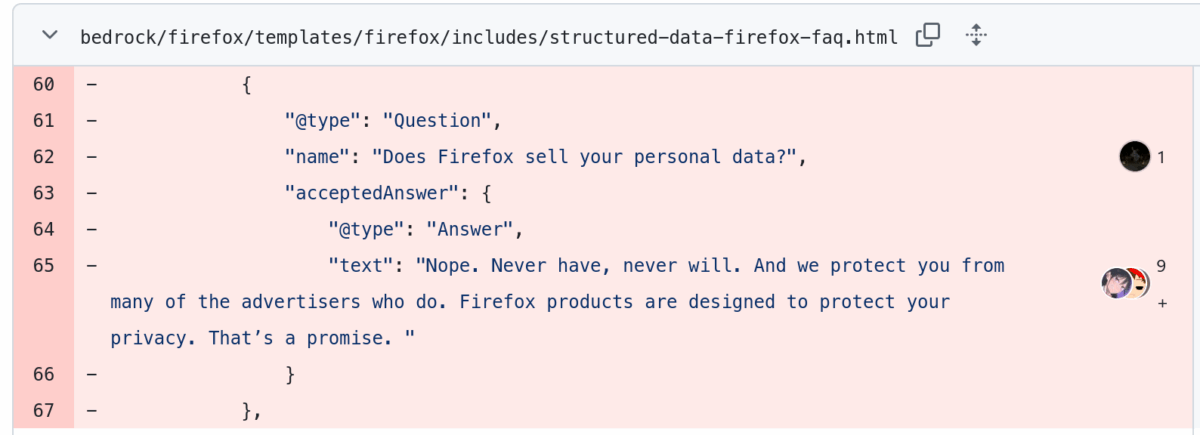
- Around the same time, Mozilla updated their Privacy FAQ and quietly dropped the clear “we never sell your data” language, replacing it with something more vague. You can check the image below to see what Firefox has removed from its FAQ page.
- And while Firefox deserves credit for being the only major non-Chromium browser, it’s started to fall behind in staying up to date with web standards and features. It still lacks support for many current web standards like WebHID and the EyeDropper API, while deliberately avoiding others like File System Access and WebUSB.
None of this makes Firefox or Brave bad browsers. But it does mean there’s room for something better.
What makes Helium browser different
Helium is built on ungoogled-chromium, a version of Chromium that strips out Google’s background services and tracking hooks, and then strips it further. The result is a browser with no telemetry, no crash reports phoning home, and privacy options turned on before you ever touch a setting.
The only extension that ships with it is uBlock Origin, which is itself open source and privacy-respecting. And while Google is actively working to limit uBlock Origin on Chrome through the MV3 transition, Helium preserves MV2 support, so you keep the full ad and tracker blocker working as intended.
You just need to install it, select your default search engine, and start using it. Helium even keeps privacy-friendly options at the top like Kagi and DuckDuckGo, while letting you select Google Search if you prefer.

This is the baseline most people expect from a “privacy browser,” but we rarely get without tweaking.
The unique feature you won’t find elsewhere
Every time you install or update a Chrome extension in any Chromium browser, your request goes directly to Google’s Chrome Web Store. Google can see which extensions you’re installing, when you’re installing them, and over time build a picture of your browser setup. This happens in Chrome, obviously, but also in Brave, Ungoogled Chromium, LibreWolf, and Zen Browser, and most other privacy-focused alternatives.
Helium routes these requests through its own proxy. When you install an extension, the request goes to Helium’s server first, which fetches it from Google on your behalf. Google sees the proxy, not you.
Also, there’s no change to your experience. You install extensions the same way, they work the same way. The data path is just different.

For those who don’t want to simply trust Helium’s servers, the entire service stack is open source and can be self-hosted. The proxy, the update checker, the uBlock filter fetcher, all of it can run on your own server if you want that level of control.
Helium browser limitations you should know
Helium isn’t for everyone, and it’s worth being upfront about the gaps.
- Desktop only. There’s no mobile version yet. If you need a browser that syncs across your phone and computer, this won’t replace your current setup entirely.
- No Widevine. DRM-protected content — Netflix, Spotify, Disney+ — won’t play. You’ll need a separate browser for streaming. Annoying, but manageable if privacy is the priority.
- macOS gets the smoothest experience. Auto-updates work out of the box on macOS. Windows and Linux users need to manually install new versions or manage updates through a package manager.
- It’s still in beta. The browser has been stable in my five months of use, but the stable release isn’t out yet.
There’s also a real-world risk that comes with any small-team browser: keeping pace with Chromium’s security patches. It’s worth keeping an eye on their GitHub release cadence to make sure you’re not running a version that’s weeks behind on a critical security fix.
Who should use Helium browser
Helium fits well if you’re a desktop user who wants a browser that doesn’t bundle things you never asked for, and where privacy is genuinely the default rather than something you have to configure.
If you stream a lot or need your browser on your phone, you’ll run into its limits quickly. It makes sense to keep a second browser for those cases, or wait for those gaps to close.
It’s not a perfect browser, and it’s still maturing. But if you’ve been frustrated with how Brave and Firefox have evolved, it’s a reasonable alternative that’s worth trying.
You might also like: